FOX Nation: Celebrate America
- 3.9
- Rating
- 1.00M
- Installs
- Free
- Price

 Analysis by App-foxy
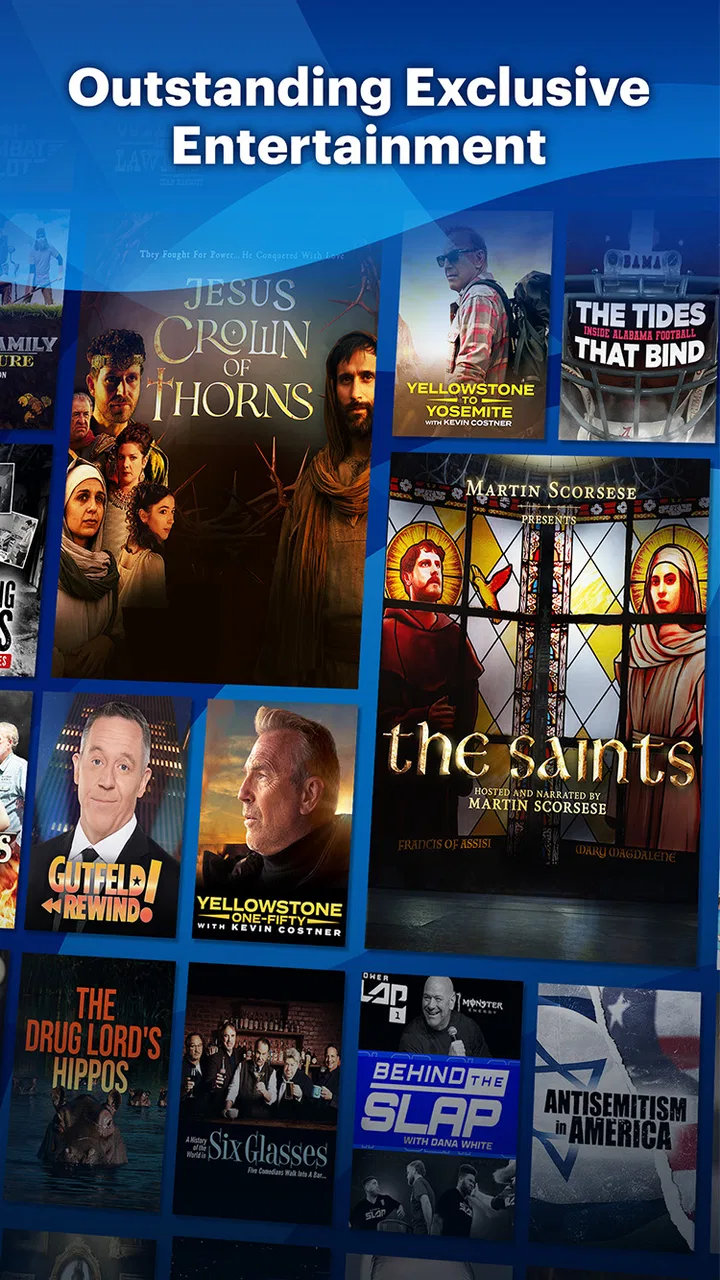
I approached FOX Nation: Celebrate America as a news and entertainment app rather than as a replacement for a general streaming service. That distinction matters. Its focus is FOX Nation programming, including television shows, movies, documentaries, and other entertainment, so the experience feels more like entering a particular editorial world than browsing an unlimited video library. I found it most appealing when I already knew what kind of presentation I wanted and less useful when I was simply looking for the broadest possible selection.
The app is free to install, carries a Teen age rating, and is made by FOX News Network, LLC. Its presence is well established on Android, with more than a million installs, while its average score sits at 3.9 from roughly 19 thousand ratings. Those figures suggest a substantial audience but also a mixed experience: plenty of people find value in the service, yet it clearly is not universally satisfying. My own view is that the app can be worthwhile for viewers who specifically enjoy FOX Nation’s style and programming, but it deserves a closer look before you treat it as your main source of video entertainment.
How FOX Nation feels to use today
My first impression was that the app is built around browsing and watching rather than around complicated setup. The free download makes it easy to try, and the content categories give the service a recognizable identity. Instead of presenting itself as a neutral catalog covering every taste, it puts its own shows, documentaries, movies, and entertainment at the center. That focus can be a strength because you are not forced to sift through an enormous, unfocused library.
You May Also Like

 Blood Strike: 2.5 Anniversary
Blood Strike’s Loadouts Turn Every Drop Into a Tactical Gamble
A close look at Blood Strike’s custom loadouts: how fast access to signature weapons reshapes its battle royale rhythm, rewards preparation, and narrows the gap between fights.

 Pandora - Music & Podcasts
Pandora’s Music Is Easy to Start, but Harder to Recover
Pandora’s strength is its low-effort path from a seed to a station. Its weak spot is how much confidence it asks you to place in connection, setup, and quiet recovery.

 8 Ball Pool
 Is Built on Rivalries, Rematches, and Routine
A close look at the rivalries, rematches, shared routines, and unanswered safety questions that turn a quick pool match into a persistent mobile community.

 Samsung Music
’s Quiet Strength Is Playing What You Already Own
Its reach comes less from spectacle than from dependable access to a personal library. That simplicity is both the app’s strongest retention engine and its ceiling.

 AccuWeather: Weather Radar
AccuWeather Review: A Quick, Clear Forecast for Everyday Decisions
For everyday plans, the best forecast is the one you can understand quickly. AccuWeather makes rain timing, radar, and local conditions easy to act on, with a few trade-offs.

 Hill Climb Racing
Why Hill Climb Racing Still Turns Crashes Into One More Run
A tiny car, a bumpy hill and one more upgrade: Hill Climb Racing keeps resurfacing because its simple chaos makes every near-miss feel personal.
More From Our News Desk



At the same time, the focused catalog creates a clear limit. If I open a general streaming platform, I can usually move between very different genres, studios, and viewpoints. FOX Nation is more specialized. I would choose it when I want its particular programming, not when I want a single app to cover every possible evening plan. That makes the decision fairly simple: the closer your interests are to the service’s editorial approach, the more natural the app feels.
The app also works best when I treat it as an intentional viewing destination. For example, I can imagine opening it after work to watch a documentary or a familiar television program instead of scrolling through unrelated recommendations. That is a small but useful distinction. A broad streaming app is often designed to keep me searching; this one is easier to understand when I arrive with a specific interest in FOX Nation content.
Because the download is free, trying it does not require an immediate financial commitment. However, free installation should not be confused with unlimited access to everything inside the service. The app includes in-app purchases ranging from $8.99 to $71.49 per item, so I would check the actual access terms shown during signup or when selecting content. This is particularly important if you are installing it for a family member who may tap through a subscription screen without noticing the cost.
The best everyday use cases
One realistic use is a short, planned viewing session. Suppose I have half an hour before dinner and want something more substantial than a quick social video. I can open the app, look for a program or documentary that matches my interests, and use it as a dedicated source of television-style viewing. The experience is more satisfying when I decide in advance that I want FOX Nation material, rather than expecting the app to surprise me with every kind of entertainment.
It can also suit viewers who prefer watching on a phone or tablet while traveling around the home. A mobile news-and-entertainment app is convenient for a kitchen counter, a bedroom, or a commute when a larger television is not available. I would still pay attention to screen size and connection quality, because longer-form video is more comfortable on a larger display and less forgiving of interruptions than reading an article.
Another useful workflow is to separate discovery from commitment. I would browse the available programming first, identify several things I genuinely want to watch, and only then decide whether the paid access makes sense. This avoids subscribing simply because the app looks polished at first launch. It also helps reveal whether the catalog is deep enough for my habits or whether I would quickly run out of programs that interest me.
What the app’s history tells existing users
FOX Nation was released on November 26, 2018, so it is not a brand-new experiment. That age gives it a more established identity than a newly launched streaming application, and the install base reinforces the impression that it has become a familiar destination for its intended audience. I would not judge it as an untested concept; I would judge it as a mature, specialized service that needs to keep earning attention from people who have many entertainment alternatives.
The release history is also a reminder that a long-running app is not automatically the right app for every current device or viewing habit. Existing users should think about what has improved in their own experience over time: whether finding programs feels easy, whether playback fits their routine, and whether the available selection still justifies continued use. A service can remain recognizable while a user’s expectations change around search, recommendations, casting, downloads, or cross-device viewing.
I would be careful not to assume that installing the latest available build means every past frustration has disappeared. The most practical way to evaluate the current state is to use the app with your real routine: search for the programs you care about, watch long enough to judge comfort, and inspect the purchase screen before agreeing to anything. That test is more useful than relying on the app’s age or its overall score alone.
How it compares with ordinary alternatives
Compared with a general news app, FOX Nation offers a more video-led experience. A news reader is usually better when I need quick headlines, written reporting, live updates, or several viewpoints in one place. I would not install this app as my only source of current information if my priority were speed and breadth. Its value is closer to curated television and documentary viewing than to a complete daily news desk.
Compared with a large, general streaming platform, the trade-off is the opposite. A broad service normally wins on variety, while FOX Nation wins on focus for people who specifically want its programming. I would choose the larger platform for a mixed household where one person wants comedy, another wants drama, and someone else wants documentaries from many providers. I would choose FOX Nation when the household already agrees that its particular shows and editorial voice are the main attraction.
It also differs from free video platforms. Free platforms can offer a huge amount of material, but discovery may be inconsistent and the viewing experience can feel less curated. FOX Nation’s narrower identity can make it easier to decide what belongs to the service. The downside is that the narrower catalog gives me fewer escape routes when nothing immediately appeals.
Subscription decisions and practical friction
The biggest practical question is not whether the app costs anything to download; it is whether the content you want is available under the access option you select. Since individual in-app purchase amounts can reach $71.49, I would read each screen carefully, confirm the billing interval, and avoid treating a prominent trial or subscription button as a casual one-tap decision. This is good practice with any streaming app, but it matters especially when the catalog is specialized.
I would also decide whether the service is for one-off viewing or regular use. If I only want a single documentary or occasional program, paying for extended access may not feel worthwhile. If I expect to return every week, the calculation changes, because convenience and familiarity become part of the value. The right choice depends less on the download price and more on how often the available programming fits your actual schedule.
For parents, the Teen rating is an important starting point. I would not assume that every program inside a news and entertainment catalog is suitable for younger children simply because the app is easy to install. A parent should review what a child can browse and watch, and should keep purchase controls in mind. The app may be appropriate for teenagers in some households, but that is different from being a child-focused service.
Where the current experience still falls short
The specialization that gives FOX Nation its personality can also make the app feel narrow. If I want a neutral overview of a developing story, a wide range of international coverage, or a large selection of unrelated films, I would reach for another app first. This is not a minor distinction; it affects whether the service feels essential or merely occasional.
There is also a commitment issue. A focused catalog works brilliantly when it matches my interests, but it has less value when my viewing habits change from day to day. I may enjoy a documentary tonight and then want a completely different kind of program tomorrow. A general streaming service handles that shift more gracefully, while FOX Nation asks me to remain interested in its particular mix.
The mixed average rating is another reason to keep expectations realistic. A 3.9 average from around 19 thousand ratings indicates that the app has a meaningful audience but not a uniformly smooth reputation. I would interpret that as a prompt to test the practical details myself rather than as proof that the app is either excellent or poor. Device behavior, viewing preferences, and expectations about access can strongly affect the experience.
I also would not use the app as a substitute for every kind of news consumption. Its entertainment and documentary side may be more appealing for relaxed viewing, but someone who needs rapid written updates, extensive source comparison, or a broad selection of publishers should add a conventional news reader. Using the right tool for each purpose is better than demanding that one specialized app do everything.
Small habits that make the app easier to judge
My first tip is to create a short personal watchlist before paying for anything. I would note several programs that genuinely interest me, then return to them across a few sessions. This reveals whether the app has enough depth for repeated use. It also prevents the common mistake of subscribing after finding only one appealing title.
My second tip is to test the app at the time and place where you normally watch. A service that feels fine during a quick daytime trial may be less convenient during a long evening session. Try it on the device you actually use, with the connection you normally have, and pay attention to how quickly you can move from opening the app to starting something worthwhile.
My third tip is to treat the catalog’s point of view as part of the product, not as background decoration. Before committing, ask whether you are comfortable spending regular viewing time within that editorial environment. If you mainly want variety or balance across many sources, a different combination of apps will probably serve you better. If you already prefer FOX Nation’s approach, the same focus may be exactly why you keep returning.
A fourth useful habit is to separate household access from household expectations. One person may enjoy the programming while another may find the catalog too limited. I would discuss who plans to use the account, who can make purchases, and what kind of viewing the app is meant to provide. That simple conversation can prevent disappointment and unexpected charges.
What to watch as the service continues
For a mature app like this, I would watch how it continues to balance identity with usability. The strongest future direction would be improvements that make the existing programming easier to discover and return to without diluting the focused character that attracts its audience. Clear organization, dependable playback, and sensible access explanations matter more here than simply adding more titles.
I would also pay attention to whether the service becomes more useful across different viewing situations. A viewer may begin on a phone, continue on a tablet, or prefer a television for longer programs. Any improvement that reduces friction between those situations would make the app feel more like a dependable home for its content rather than a place I visit only occasionally.
At the same time, I would not expect this app to transform into a neutral, all-purpose streaming platform. Its appeal comes from being FOX Nation, not from imitating every competitor. The better question is whether it continues to serve its intended audience clearly and honestly. If the answer is yes, its specialization remains a strength. If the catalog or access options stop matching user expectations, the same specialization becomes a reason to leave.
My recommendation after using it
I recommend FOX Nation to viewers who specifically want FOX Nation shows, movies, documentaries, and entertainment in a dedicated mobile app. The free installation makes a trial sensible, and the service’s established presence suggests it is more than a temporary experiment. I appreciate that its identity is clear: I know what kind of viewing experience I am entering, and that can be more convenient than searching through a huge general catalog.
I would skip it as a primary app if I mainly need fast written news, a broad range of publishers, extensive international coverage, or a general entertainment library for several different tastes. I would also hesitate if I only plan to watch one occasional program and do not want to manage in-app purchase choices. In those situations, a standard news reader or broader streaming service is likely to be a better fit.
Overall, my opinion is positive but specific. This is a focused viewing service, not an everything app. Its value depends on whether its programming and editorial style already match what you want to watch. Try it with a real viewing plan, inspect the access terms carefully, and judge it by how often you return—not simply by the fact that it is free to download. For the right viewer, that focused approach is the reason to keep it; for everyone else, it is the clearest warning.
FAQs for FOX Nation: Celebrate America
01What content is available on FOX Nation?
FOX Nation offers a variety of content, including original shows, documentaries, and exclusive news coverage. Subscribers can access series hosted by popular personalities, historical documentaries, and special events. The app also provides a platform for patriotic and conservative-themed programming, ensuring a unique viewing experience tailored to its audience.
02Is FOX Nation available on both Android and iOS devices?
Yes, FOX Nation is available for download on both Android and iOS devices. Users can find the app on the Google Play Store for Android devices and the Apple App Store for iOS devices. This ensures accessibility across a wide range of smartphones and tablets, making it convenient for most users.
03Does FOX Nation require a subscription to access content?
Yes, FOX Nation requires a subscription to access its full library of content. While some promotional content might be available for free, a subscription unlocks all shows, documentaries, and exclusive features. Various subscription plans are available, often including trial periods or discounts for new users.
04Can I download content from FOX Nation for offline viewing?
Yes, FOX Nation allows subscribers to download select content for offline viewing. This feature is particularly useful for users who want to watch shows and documentaries without relying on a constant internet connection, making it ideal for travel or areas with limited connectivity.
05Are there parental controls available on FOX Nation?
FOX Nation includes parental controls to help manage what younger viewers can access. These controls allow parents to restrict access to certain types of content, ensuring a safe and appropriate viewing experience for all family members. It's a helpful feature for families who want to monitor their children's screen time and content exposure.
Pros
- Extensive library of patriotic content.
- User-friendly interface and navigation.
- Exclusive access to FOX Nation events.
- High-quality streaming with minimal buffering.
- Offline viewing available for select content.
Cons
- Limited content for non-American audiences.
- Requires subscription for full access.
- Content updates can be infrequent.
- No live news streaming available.
- App performance varies on older devices.

FOX Nation: Celebrate America
Gallery